Installation
The tool is distributed as portable package, so just download the latest tarball from Downloads section, extract, configure, compile, and install:
$ tar -xzvf slowhttptest-x.x.tar.gz

$ cd slowhttptest-x.x

$ ./configure --prefix=PREFIX

$ make

$ sudo make install
Where PREFIX must be replaced with the absolute path where slowhttptest tool should be installed.
You need libssl-dev to be installed to successfully compile the tool. Most systems would have it.
Update: Apologies for FreeBSD users for failed build. Fix checked into svn. Use
svn checkout http://slowhttptest.googlecode.com/svn/trunk/ slowhttptest-read-only
to build on FreeBSD, until we release new version.
Usage
Tool works out-of-the-box with default parameters, which are harmless and most likely will not cause a Denial of Service. Type
$ PREFIX/bin/slowhttptest
and test begins with the following default parameters:
| test type | SLOW HEADERS |
| number of connections | 50 |
| URL | http://localhost/ |
| verb | GET |
| interval between follow up data | 10 seconds |
| connections per second | 50 |
| test duration | 240 seconds |
| probe connection timeout | 5 seconds |
| max length of followup data field | 32 bytes |
Every connection generates an initial request containing:
GET / HTTP/1.1
Host: localhost:80
User-Agent: Mozilla/4.0 (compatible; MSIE 8.0; Windows NT 6.1; Trident/4.0; SLCC2)
Where user-agent is being randomly picked from hard-coded list of user-agent strings, and remains the same for entire test.
Then, every 10 seconds a follow up header with random name and value each not greater than 32 bytes is being sent:
X-HMzV2bwpzQw9jU9fGjIJyZRknd7Sa54J: u6RrIoLRrte4QV92yojeewiuDa9BL2N7.
. 10 seconds.
X-nq0HRGnv1W: T5dSL.
. 10 seconds.
X-iFrjuN: PdR7Jcj27P
.
.
Repeated until server closes the connection or test hits time limit, 240 seconds in this case. There is a Probe socket, which connects every second and takes a probe of web server availability by sending complete GET request. If server responds within probe connection timeout interval (specified by -p argument), server is considered available, otherwise it's considered DoSed. Default value of 5 seconds might be not enough for slow servers, or if SSL connection is being used, so appropriate value should be around average response time of the server.
Full list of configurable options is the following:
| -a start | start value of ranges-specifier for range header test |
| -b bytes | limit of range-specifier for range header test |
| -c number of connections | limited to 1024 |
| -H, B, R or X | specify to slow down in headers section or in message body, -R enables range test, -X enables slow read test |
| -g | generate statistics in CSV and HTML formats, pattern is slow_xxx.csv/html, where xxx is the time and date |
| -i seconds | interval between follow up data in seconds, per connection |
| -k pipeline factor | number of times to repeat the request in the same connection for slow read test if server supports HTTP pipe-lining. |
| -l seconds | test duration in seconds |
| -n seconds | interval between read operations from receive buffer |
| -o file | custom output file path and/or name, effective if -g is specified |
| -p seconds | timeout to wait for HTTP response on probe connection, after which server is considered inaccessible |
| -r connections per second | connection rate |
| -s bytes | value of Content-Length header, if -B specified |
| -t verb | custom verb to use |
| -u URL | target URL, the same format you type in browser, e.g https://host[:port]/ |
| -v level | verbosity level of log 0-4 |
| -w bytes | start of range the advertised window size would be picked from |
| -x bytes | max length of follow up data |
| -y bytes | end of range the advertised window size would be picked from |
| -z bytes | bytes to read from receive buffer with single read() operation |
Example of usage in slow message body mode:
./slowhttptest -c 1000 -B -g -o my_body_stats -i 110 -r 200 -s 8192 -t FAKEVERB -u https://myseceureserver/resources/loginform.html -x 10 -p 3
Example of usage in slowloris mode:
./slowhttptest -c 1000 -H -g -o my_header_stats -i 10 -r 200 -t GET -u https://myseceureserver/resources/index.html -x 24 -p 3
Output
Depends on verbosity level, output can be either as simple as heartbeat message generated every 5 seconds showing status of connections with verbosity level 1, or full traffic dump with verbosity level 4.
-g option would generate both CSV file and interactive HTML based on Google Chart Tools.
Here is a sample screenshot of generated HTML page
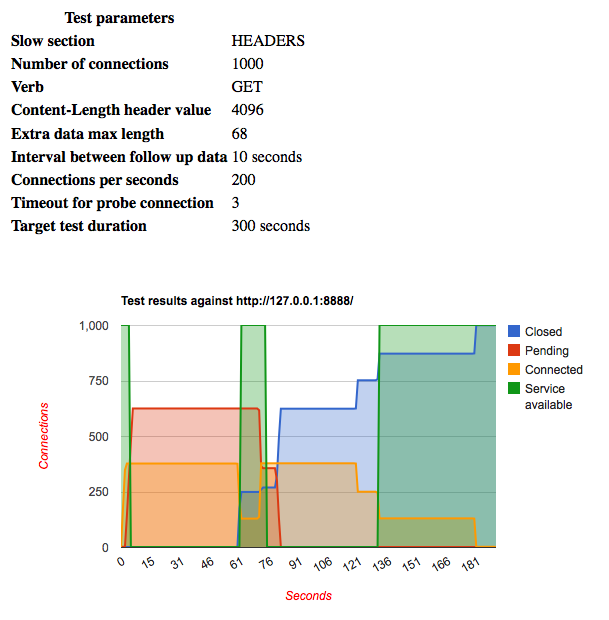
that contains graphically represented connections states and server availability intervals, and gives the picture on how particular server behaves under specific load within given time frame.
CSV file can be used as data source for your favorite chart building tool, like MS Excel, iWork Numbers, or Google Docs.
Copy from http://code.google.com/p/slowhttptest/

No comments:
Post a Comment